In today’s rapidly evolving digital landscape, Australian small to medium businesses (SMBs) are increasingly reliant on cloud-based solutions to drive productivity and collaboration. Microsoft 365, with its suite of familiar applications, has become a cornerstone for many. However, the convenience of these tools can mask significant security vulnerabilities if not properly configured and managed.
Many SMBs mistakenly believe that simply subscribing to Microsoft 365 equates to comprehensive protection. This perception can leave them exposed to sophisticated cyber threats, potentially leading to data breaches, financial loss, and reputational damage. It’s crucial to understand that Microsoft 365 offers a robust security framework, but its effectiveness hinges on active implementation and strategic configuration by your business.
Is Your Business Missing Out on Microsoft 365’s Built-in Security Power?
The evolving threat landscape for Australian SMBs in 2026
The digital frontier for Australian SMBs in 2026 presents a complex and ever-shifting threat landscape. Cybercriminals are becoming more sophisticated, employing advanced tactics to target businesses of all sizes. For SMBs, the perceived lack of dedicated IT security resources can make them particularly attractive targets. Common threats include ransomware attacks, which can encrypt critical business data and demand hefty payments for its release, and sophisticated phishing campaigns designed to trick employees into revealing sensitive credentials or downloading malware. The Australian Cyber Security Centre (ACSC) consistently highlights the growing risk to businesses, with many attacks originating from well-organised criminal groups. Understanding these evolving threats is the first step towards mitigating them effectively. This includes staying informed about new attack vectors and understanding how they might impact your specific industry. For a deeper dive into these prevalent dangers, consider exploring 2026: Australian SMB Cybersecurity Threats.

Beyond direct attacks, supply chain compromises are also a growing concern. An attacker might target a less secure third-party vendor to gain access to a larger organisation’s network. For Australian SMBs operating in sectors like healthcare or finance, the consequences of a breach extend beyond financial loss to include significant regulatory penalties. Ensuring your digital infrastructure, including your Microsoft 365 environment, is fortified against these multifaceted risks is no longer optional; it is a fundamental business necessity. Proactive security measures can significantly reduce the likelihood and impact of a successful cyberattack, safeguarding your operations and customer trust. Ignoring these evolving threats is akin to leaving your business doors unlocked in an increasingly dangerous neighbourhood.
Why Microsoft 365 is more than just email and documents
Many Australian SMBs view Microsoft 365 primarily as a tool for email (Outlook) and document creation (Word, Excel). While these functionalities are core, the platform encompasses a far broader and more integrated suite of services, many of which possess powerful, often underutilised, security capabilities. Services like SharePoint, Teams, OneDrive, and Azure Active Directory (now Microsoft Entra ID) form an interconnected ecosystem. Each of these components generates and stores valuable data, and critically, manages user identities and access. This makes them prime targets for cybercriminals. Therefore, a holistic understanding of Microsoft 365 is essential for effective security. It’s not just about securing individual applications, but about securing the entire digital workspace and the data flowing within it. A comprehensive approach ensures that the platform works cohesively to protect your organisation.
Leveraging the full security potential of Microsoft 365 requires looking beyond basic subscription features. It involves understanding the interconnectedness of its services and how they can be configured to provide layered defence. For instance, identity and access management are central to security, and Microsoft 365’s identity solutions can be configured to enforce granular access controls based on user roles, device compliance, and location. Similarly, the platform offers advanced threat protection for email and collaboration tools, helping to block malicious content before it reaches your employees. Embracing these advanced features can transform Microsoft 365 from a productivity suite into a robust security fortress for your business. This strategic utilisation is key to staying ahead of threats and ensuring business continuity.
Beyond Basic Protection: Essential Microsoft 365 Security Features for SMBs
Multi-Factor Authentication (MFA): Your First Line of Defence
Multi-Factor Authentication (MFA), often referred to as Two-Factor Authentication (2FA), is arguably the single most effective security measure Australian SMBs can implement within Microsoft 365. It adds a crucial layer of defence beyond just a password, requiring users to provide at least two distinct forms of verification before gaining access to their accounts. These factors typically fall into three categories: something the user knows (like a password), something the user has (like a smartphone receiving an SMS code or using an authenticator app), or something the user is (like a fingerprint or facial scan). Implementing MFA drastically reduces the risk of account compromise, even if an attacker obtains a user’s password through phishing or data breaches. This is particularly vital given the prevalence of credential stuffing attacks targeting business accounts. For businesses in regions like Western Sydney, ensuring strong authentication practices is a foundational element of cybersecurity.
When configuring MFA for your Microsoft 365 environment, consider the most user-friendly yet secure options. Microsoft Authenticator app notifications, which allow users to approve sign-in requests with a single tap, are generally preferred over SMS codes, as they are less susceptible to SIM-swapping attacks. The implementation should be mandatory for all users, including administrators, and should be applied across all Microsoft 365 services. A common pitfall is allowing users to skip MFA for specific applications or under certain conditions, which creates potential backdoors. Regular communication with staff about the importance of MFA and how to use it effectively is also crucial for successful adoption. By making MFA a non-negotiable requirement, your business significantly strengthens its resilience against unauthorized access, protecting sensitive data and ensuring operational continuity.
Conditional Access Policies: Smart Access, Stronger Security
Conditional Access policies within Microsoft 365 (part of Microsoft Entra ID) represent an advanced security control that allows organisations to dictate how and when users can access applications and data. Instead of a simple “allow” or “deny,” these policies enable granular control based on a variety of conditions. This means you can define rules such as “allow access to sensitive applications only from company-managed devices, when the user is located within Australia, and only if they complete MFA.” This intelligent approach helps to balance security with user productivity, ensuring that legitimate access is granted swiftly while blocking suspicious attempts. For SMBs, this is particularly valuable as it automates security decisions that would otherwise require manual intervention or complex rule sets.
Crafting effective Conditional Access policies requires a thorough understanding of your business operations and user workflows. Start by identifying your most critical applications and sensitive data. Then, consider the context of access: Where are your users located? What types of devices do they use? Are these devices managed and compliant with your security standards? By combining these signals, you can create policies that are both robust and practical. For instance, a policy might require MFA for accessing SharePoint Online from an unmanaged device or outside of business hours, while allowing seamless access from a company-issued, compliant laptop during work hours. Regularly reviewing and refining these policies is essential, as both your business needs and the threat landscape evolve. Incorrectly configured policies can lead to user frustration or, conversely, security gaps, so careful planning and testing are paramount. Embracing Conditional Access transforms your security posture from reactive to proactive, making it far harder for threats to penetrate your environment. Ensuring your users can still work effectively while enforcing strict security protocols is the goal, and this feature is key to achieving it.
Email Security: Combating Phishing and Malware in 2026
Email remains a primary vector for cyberattacks targeting Australian SMBs, making robust email security within Microsoft 365 an absolute necessity in 2026. While basic spam filters offer some protection, modern threats require advanced capabilities like Microsoft Defender for Office 365. This suite of tools provides comprehensive protection against phishing, malware, and other malicious content designed to compromise your users and systems. Features such as anti-phishing policies that use machine learning and impersonation detection can identify and block sophisticated attacks that traditional filters miss. Safe Attachments and Safe Links proactively scan email attachments and URLs, preventing users from opening or clicking on dangerous content, even if the threat emerges after the email has been delivered. This proactive defence against email-borne threats is critical for safeguarding your organisation’s sensitive information and operational integrity.
Implementing effective email security involves more than just enabling the default settings. It requires a tailored approach based on your business’s specific risk profile. For example, you might configure stricter phishing filters for executives or departments that handle particularly sensitive financial or customer data. User education remains a vital component; even the most advanced technical controls can be bypassed if employees are not trained to recognise social engineering tactics. Regular training sessions on identifying suspicious emails, reporting them, and understanding the dangers of clicking unknown links are essential. Furthermore, implementing policies that limit the types of files employees can receive or send, or establishing clear procedures for handling sensitive information via email, can create additional layers of security. By actively managing and optimising your Microsoft 365 email security settings, and complementing them with ongoing user awareness programs, you can significantly reduce the attack surface and protect your business from one of the most persistent threats in the digital realm.
Securing Your Data: Protecting Sensitive Information in Microsoft 365
Data Loss Prevention (DLP): Preventing Accidental or Malicious Leaks
Data Loss Prevention (DLP) policies in Microsoft 365 are designed to prevent sensitive information from leaving your organisation, whether accidentally or maliciously. This is crucial for Australian SMBs aiming to comply with privacy regulations and protect their intellectual property. DLP works by identifying, monitoring, and automatically protecting sensitive data across Microsoft 365 services, including Exchange Online, SharePoint Online, OneDrive for Business, and Teams. You can configure DLP policies to detect specific types of sensitive information, such as Australian tax file numbers, credit card numbers, or confidential company documents, using predefined templates or custom rules. Once detected, policies can then take actions like blocking the sharing of the content, encrypting it, or notifying administrators and the user involved. Implementing DLP is a proactive measure against data exfiltration.
To effectively implement DLP, begin by identifying what constitutes sensitive data within your business. This often involves consulting with different departments to understand their data handling practices and compliance requirements. For example, a medical practice will have different sensitive data considerations (patient health information) than a law firm (client legal documents). Once identified, you can create custom DLP policies or adapt existing ones within the Microsoft Purview compliance portal. A common pitfall is setting policies too broadly, leading to excessive false positives and user disruption, or too narrowly, missing critical data. It’s advisable to start with a monitoring-only mode to identify potential issues and refine policies before enforcing them. Regularly review DLP reports to understand what data is being flagged and why, and adjust policies as needed. This continuous improvement ensures that your DLP strategy remains effective and aligns with your evolving business needs and the regulatory landscape, ultimately safeguarding your most valuable assets.
Encryption: Keeping Your Files and Communications Private
Encryption is a fundamental pillar of data security, ensuring that information is unreadable to unauthorised parties, even if it falls into the wrong hands. Microsoft 365 offers robust encryption capabilities across its services, protecting your sensitive data both at rest (when stored) and in transit (when being sent or received). For data at rest, services like SharePoint, OneDrive, and Exchange Online use BitLocker drive encryption and Transport Layer Security (TLS) to protect data stored on Microsoft’s servers. More granular control is available through Microsoft Purview Message Encryption, which allows you to encrypt emails and their attachments, ensuring only intended recipients can read them. This is particularly vital for Australian businesses dealing with sensitive client information or adhering to industry-specific compliance standards, such as those within healthcare or finance. Ensuring data confidentiality is paramount in today’s threat environment.
Beyond service-level encryption, Microsoft Purview Information Protection (formerly Azure Information Protection) enables end-to-end encryption and access control through the use of sensitivity labels. When a user applies a label (e.g., “Confidential” or “Internal Use Only”) to a document or email, it triggers encryption and defines who can access that information, regardless of where it is stored or shared. This allows for persistent protection that travels with the data itself. For example, an employee could label a confidential proposal as “Confidential” before emailing it to an external partner. Even if the email is intercepted, the recipient would need the proper decryption keys and permissions to open it. Implementing and managing these encryption solutions requires careful planning and user training to ensure adoption and effectiveness. Understanding the different encryption options available within Microsoft 365 and how they apply to your specific data types and workflows is key to building a secure and compliant data environment.
Information Protection Labels: Classifying and Protecting Sensitive Documents
Information Protection Labels, a core component of Microsoft Purview Information Protection, provide a sophisticated method for classifying and protecting sensitive data within Microsoft 365. These labels act as digital tags that users can apply to documents, emails, and even Teams chats. Applying a label not only classifies the information (e.g., “Public,” “Internal,” “Confidential,” “Highly Confidential”) but can also automatically trigger protective actions, such as applying encryption, watermarking, or restricting sharing. This empowers users to make informed decisions about data handling based on the sensitivity of the content they are working with, integrating security directly into their daily workflows. For Australian SMBs, this is a powerful tool for maintaining compliance and preventing accidental or intentional data leaks.
The effectiveness of information protection labels hinges on a well-defined classification scheme and clear user guidance. Before deploying labels, conduct a thorough assessment of the types of sensitive data your organisation handles and the associated risks. Define a logical hierarchy of labels that reflects this assessment. For example, “Internal” might permit sharing within the company, while “Confidential” could restrict sharing to specific departments or individuals and apply encryption. Once defined, configure these labels within the Microsoft Purview compliance portal. Crucially, provide comprehensive training to your employees on what each label means and how to apply them correctly. A common challenge is user adoption; if employees find the process cumbersome or don’t understand the purpose, they may bypass it. Consider enabling auto-labeling capabilities for specific conditions (e.g., automatically label documents containing a certain number of credit card numbers as “Confidential”). By integrating information protection labels seamlessly into your operations, you create a culture of data stewardship and significantly enhance your ability to protect sensitive information.
User and Device Management: Controlling Access and Ensuring Device Health
Device Management with Microsoft Intune (Endpoint Manager)
In today’s hybrid work environment, managing and securing the devices your employees use to access Microsoft 365 data is paramount. Microsoft Intune, part of Microsoft Endpoint Manager, provides a powerful cloud-based solution for mobile device management (MDM) and mobile application management (MAM). It allows Australian SMBs to configure security settings, deploy applications, enforce compliance policies, and remotely wipe devices if they are lost or stolen. Whether your employees use company-issued laptops, tablets, or their own personal devices (BYOD), Intune helps ensure that these endpoints meet your organisation’s security standards before they can access sensitive company data. This comprehensive device posture management is essential for preventing unauthorised access and data breaches stemming from compromised devices.
Implementing Intune involves defining device compliance policies – rules that devices must meet to be considered compliant. These policies can dictate requirements such as minimum operating system versions, disk encryption, password complexity, and the presence of up-to-date antivirus software. Once these policies are set, Intune can then be integrated with Microsoft Entra ID’s Conditional Access policies. This integration ensures that only compliant devices are granted access to corporate resources. For example, a user attempting to access email from a laptop that does not have disk encryption enabled would be blocked until the issue is resolved. Intune also offers application management capabilities, allowing you to deploy approved applications to devices and manage corporate data within those applications, even on personal devices, without accessing the user’s personal data. By centralising device and application management, Intune simplifies IT administration and significantly strengthens your organisation’s overall security posture. Exploring solutions like cyber resilience can further enhance your defence strategies.
Controlling Application Access and Permissions
Managing who has access to what applications and what they can do within those applications is a cornerstone of robust security for any Australian SMB using Microsoft 365. Microsoft 365 offers granular control over application access through a combination of Microsoft Entra ID (formerly Azure Active Directory) and role-based access control (RBAC). This allows administrators to assign specific roles to users, granting them the necessary permissions to perform their job functions without providing excessive privileges. For example, a finance officer might need full access to accounting applications, while a sales representative might only require read-only access to customer relationship management (CRM) data. Implementing the principle of least privilege – granting users only the permissions they absolutely need – significantly reduces the attack surface and limits the potential damage from a compromised account.
Beyond user roles, Microsoft 365 also allows for the management of third-party application access. Many SMBs integrate cloud services with their Microsoft 365 environment, such as CRM systems or project management tools. It’s crucial to review the permissions these applications request and grant them only the necessary access. Regularly auditing the applications connected to your tenant and the permissions they hold is vital. Revoke access for applications that are no longer used or that have overly broad permissions. Furthermore, consider implementing application proxy or single sign-on (SSO) solutions to streamline access and enhance security for cloud-based applications. By carefully controlling application access and permissions, you ensure that only authorised users and services can interact with your critical business applications and data, thereby preventing unauthorised access and data manipulation.
Regular Audits: Keeping an Eye on User Activity
Regular auditing of user activity within Microsoft 365 is indispensable for maintaining a strong security posture and ensuring compliance for Australian SMBs. Microsoft 365 generates a wealth of audit logs that track a wide range of activities, from user sign-ins and file access to administrative changes and policy modifications. By reviewing these logs, IT administrators can detect suspicious behaviour, identify potential security incidents, and investigate breaches effectively. For instance, an audit log might reveal multiple failed login attempts from an unusual geographic location, indicating a brute-force attack, or show a user accessing and downloading a large volume of sensitive files outside of their normal work patterns, which could signal insider threat activity. These insights are critical for proactive threat detection and incident response.
To effectively leverage audit logs, organisations should establish a consistent auditing schedule and define what activities are most critical to monitor based on their risk profile. Microsoft Purview provides tools to configure audit policies and generate reports. For smaller businesses, manually reviewing key logs periodically might suffice, but as your organisation grows or your data sensitivity increases, consider implementing automated alerts for high-risk activities. For example, you can set up alerts for administrative role changes, the creation of new cloud applications, or access to highly sensitive data. Furthermore, retaining audit logs for a sufficient period is essential for forensic investigations and compliance requirements. Implementing a structured approach to auditing user activity not only helps in identifying and mitigating threats but also demonstrates a commitment to security and compliance to regulators and stakeholders, reinforcing trust in your business operations. For businesses seeking to reduce downtime and enhance overall IT reliability, proactive management and auditing are key components, much like those discussed in Western Sydney IT: Reduce Business Downtime.
Threat Protection: Staying Ahead of Cyber Attacks with Microsoft 365
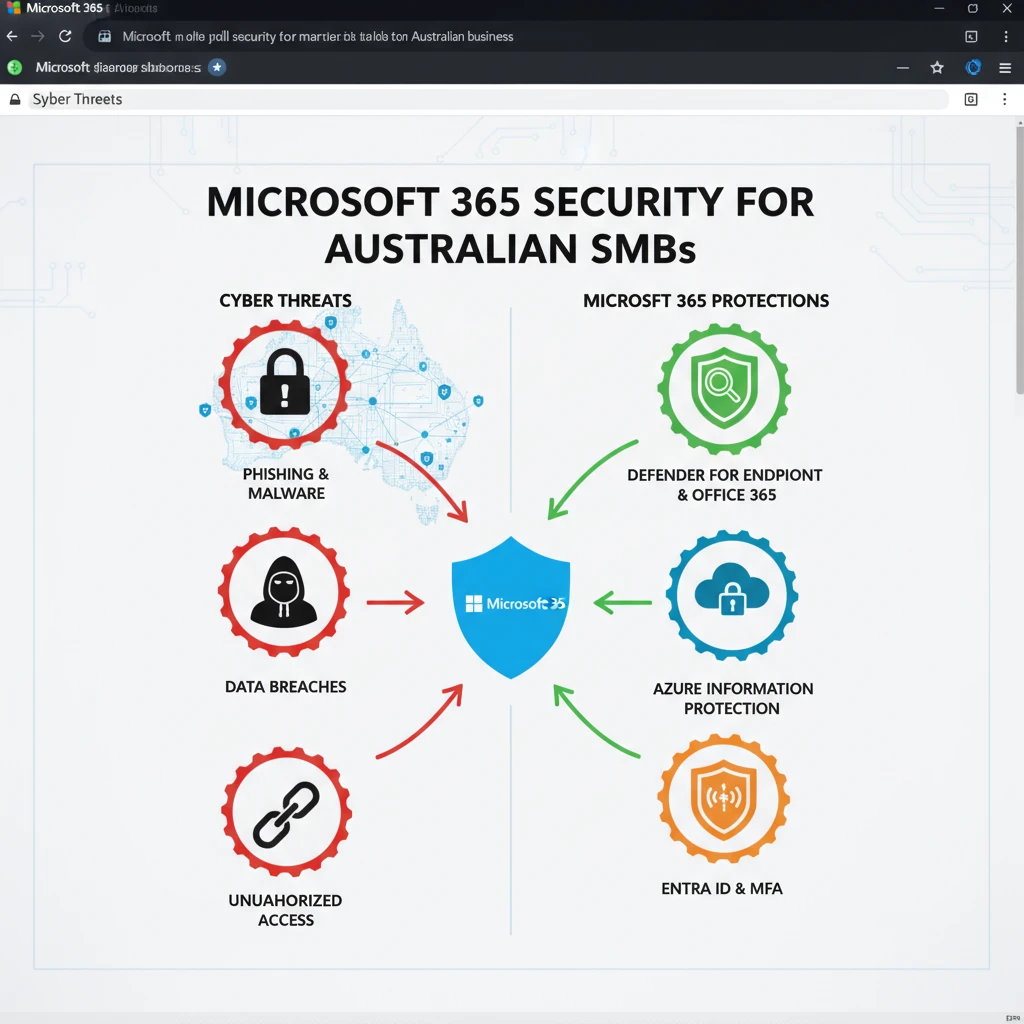
In today’s evolving digital landscape, Australian SMBs face a constant barrage of sophisticated cyber threats. Microsoft 365 provides a robust suite of tools designed to act as your first line of defence, proactively identifying and mitigating risks before they can impact your operations. Beyond basic antivirus, these solutions offer advanced threat detection capabilities, helping your business stay resilient. Understanding and implementing these features is crucial for safeguarding sensitive data and maintaining business continuity. The landscape of cyber threats is always shifting, making a proactive approach to security paramount.
Microsoft Defender for Office 365: Advanced Threat Detection
Microsoft Defender for Office 365 is an essential component for any Australian business using Microsoft 365. It goes far beyond traditional email filtering to protect against advanced threats like phishing, malware, and business email compromise (BEC). Key features include safe links and safe attachments, which scan URLs and email attachments in real-time, blocking malicious content before it reaches your users. Automated investigation and response capabilities can also help security teams quickly identify and remediate threats. For instance, a simulated phishing campaign could be detected and quarantined by Defender, preventing a potential data breach. The platform also offers rich reporting and threat analytics, giving visibility into the types of attacks your organisation is facing.
Ransomware Protection Strategies within Microsoft 365
Ransomware remains a significant threat to Australian businesses, capable of crippling operations and causing substantial financial loss. Microsoft 365 offers several layers of defence. Ransomware detection and recovery are built into services like OneDrive for Business and SharePoint Online, which can identify unusual file modification patterns indicative of an attack and allow for rapid restoration of files to a previous state. Implementing robust backup solutions, such as those offered by Digitek IT for Western Sydney businesses, is also a critical complementary strategy. Furthermore, conditional access policies and multi-factor authentication (MFA) significantly reduce the attack surface that ransomware actors can exploit by preventing unauthorised access to user accounts, which are often the initial entry point for these attacks.
Identifying and Responding to Security Incidents
Even with advanced preventative measures, security incidents can occur. Microsoft 365 provides tools to help identify and respond to these events effectively. The Microsoft 365 Defender portal consolidates security alerts and incident information from across your environment, offering a unified view for investigation. Features like advanced hunting allow security professionals to query raw data for specific threats, while incident response playbooks can guide your team through remediation steps. A well-defined incident response plan is vital; this should include clear roles, communication protocols, and procedures for isolating affected systems. Rapid detection and response minimise the damage caused by a security breach, and can be significantly enhanced by expert guidance on cyber resilience strategies.
Compliance in the Cloud: Meeting Australian Regulatory Requirements with M365 Security
For Australian SMBs, operating within the bounds of data privacy and industry-specific regulations is not just a legal obligation but a cornerstone of customer trust. Microsoft 365 offers a comprehensive set of tools and features designed to help businesses meet these stringent compliance demands. This means not only protecting data from external threats but also ensuring it is managed, accessed, and retained according to legal frameworks. By leveraging these built-in capabilities, businesses can reduce the complexity of compliance, minimise the risk of penalties, and demonstrate their commitment to data governance. Understanding which regulations apply to your specific industry and location is the first step in this process.
Understanding Australian Data Privacy Laws (e.g., Privacy Act 1988)
The Australian Privacy Act 1988 is a key piece of legislation governing how personal information is handled by Australian Government agencies and many private sector organisations. Microsoft 365 provides capabilities that can assist in adhering to these requirements, such as data loss prevention (DLP) policies that can identify and protect sensitive information. Understanding principles like the Australian Privacy Principles (APPs) – which cover collection, use, disclosure, and security of personal information – helps organisations configure M365 services appropriately. For example, implementing DLP policies to prevent sensitive customer data from being shared inappropriately is a direct application of APP guidelines. Staying informed about privacy obligations is crucial for maintaining a strong reputation and avoiding significant fines. The Office of the Australian Information Commissioner (OAIC) provides extensive guidance on these matters.
Leveraging Microsoft 365 Compliance Tools for Auditing and Reporting
Microsoft 365 offers a powerful suite of compliance tools within the Microsoft Purview compliance portal, enabling robust auditing and reporting for Australian SMBs. Features such as eDiscovery allow organisations to search for and retrieve content across Microsoft 365 services for legal or investigative purposes. Auditing logs record user and administrative activities, providing a clear trail of who did what and when. This is invaluable for demonstrating compliance and investigating potential policy violations or security incidents. For instance, a company undergoing a financial audit can use M365 audit logs to provide proof of access and modifications to financial documents. Tailoring these tools to your specific business needs ensures you can meet regulatory requirements and maintain operational transparency.
Maintaining Audit Trails for Key Business Processes
For Australian SMBs, maintaining comprehensive audit trails is essential for regulatory adherence and internal governance. Microsoft 365 services inherently generate audit logs for user activities, administrative actions, and system events. Configuring these logs appropriately and understanding how to access and analyse them is crucial. For example, in a healthcare setting, auditing access to patient records ensures compliance with health privacy legislation. For financial services, tracking all modifications to client accounts is a non-negotiable requirement. Microsoft Purview provides the framework to manage these trails, ensuring that there is a verifiable record of critical business processes. Implementing solutions for business continuity and disaster recovery also necessitates clear audit trails of data backups and restoration activities.
Proactive Security: Implementing Best Practices for Australian SMBs
Moving beyond the technical controls offered by Microsoft 365, a proactive security posture for Australian SMBs involves cultivating a security-conscious culture and implementing robust operational practices. The human element is often the weakest link in cybersecurity, making employee training paramount. Similarly, ensuring that all software is up-to-date closes known vulnerabilities that attackers frequently exploit. Adhering to the principle of least privilege ensures that even if an account is compromised, the potential damage is minimised. These practices, when combined with the technical capabilities of Microsoft 365, create a formidable defence against the ever-present threat landscape.
Regular Security Awareness Training for Staff
Human error remains a leading cause of data breaches, particularly through social engineering tactics like phishing. Regular, engaging security awareness training is therefore critical for Australian SMBs. This training should cover topics such as identifying phishing emails, understanding the risks of weak passwords, safe internet browsing habits, and reporting suspicious activity. Microsoft 365 includes features that can support these efforts, such as simulated phishing campaigns to test employee resilience. For instance, an organisation could run a quarterly training module followed by a simulated phishing test to gauge understanding and identify areas needing reinforcement. Effective training empowers employees to become an active part of your defence strategy, rather than an accidental vulnerability.
Patch Management and Software Updates
Keeping software updated is a fundamental yet often overlooked security best practice. Vulnerabilities in operating systems, applications, and firmware are constantly discovered, and cybercriminals are quick to exploit them. Microsoft 365 services themselves are automatically updated, but the devices and other software used by your employees may not be. Establishing a consistent patch management process, whether through Windows Update for Business or other management tools, ensures that systems are protected against known exploits. For example, delaying critical security patches for a workstation could leave it susceptible to ransomware that exploits a recently discovered flaw. Prioritising timely updates significantly reduces the attack surface available to malicious actors, bolstering your overall security posture.
Least Privilege Principle: Granting Only Necessary Access
The principle of least privilege dictates that users, applications, and systems should be granted only the minimum level of access required to perform their intended functions. This significantly limits the damage an attacker can inflict if an account is compromised. In Microsoft 365, this translates to carefully assigning roles and permissions. Instead of granting broad administrative rights, provide specific, role-based access. For instance, a finance department employee may need access to billing and invoicing tools, but not necessarily the ability to manage user accounts or server configurations. Regularly reviewing user permissions and revoking unnecessary access is a vital part of maintaining a secure environment, aligning with best practices for proactive IT security.
The Role of a Managed IT Service Provider in Fortifying Your M365 Security
For many Australian SMBs, managing the complexities of Microsoft 365 security alongside daily business operations can be overwhelming. A specialised Managed IT Service Provider (MSP) can be an invaluable partner in this regard. MSPs bring expertise, dedicated resources, and a proactive approach to cybersecurity, ensuring that your Microsoft 365 environment is not only configured correctly but also continuously monitored and defended. They act as an extension of your team, offering peace of mind and allowing you to focus on your core business. Their understanding of both technology and business needs is key to developing effective security strategies tailored to the Australian market.
Expertise in Australian SMB Security Needs
Australian SMBs face a unique set of challenges when it comes to cybersecurity, including specific regulatory landscapes, common threat vectors, and resource constraints. An MSP with a focus on the Australian market, particularly regions like Western Sydney, possesses the nuanced understanding required to address these needs effectively. They are familiar with local compliance requirements and can tailor Microsoft 365 configurations to meet these standards. Furthermore, they understand the common types of attacks targeting businesses in Australia and can implement appropriate countermeasures. For example, an MSP might highlight the importance of specific configurations within Microsoft 365 to comply with Australian data residency requirements or industry-specific regulations. Choosing an MSP with local expertise ensures your security strategy is relevant and effective for your business context.
Tailored Security Solutions Beyond Default Settings
While Microsoft 365 offers a powerful set of security features out-of-the-box, default settings are rarely sufficient for comprehensive protection. An experienced MSP understands how to customise and optimise these settings to align with your specific business risks and operational requirements. This might involve implementing advanced threat policies, configuring conditional access rules for different user groups, or integrating Microsoft 365 security with other security tools. For instance, an MSP could set up multi-factor authentication policies that are triggered not only by logins but also by access to sensitive applications or data, adding an extra layer of security. This bespoke approach ensures that your Microsoft 365 investment delivers maximum security value, moving beyond a one-size-fits-all solution.
Ongoing Monitoring and Incident Response
Cybersecurity is not a set-it-and-forget-it endeavour. Continuous monitoring and rapid incident response are critical for minimising the impact of security events. An MSP provides the dedicated resources and expertise to perform this vital function. They can monitor Microsoft 365 security alerts 24/7, identifying potential threats in real-time and initiating response protocols. In the event of a security incident, an MSP can manage the investigation, containment, and remediation process, often much faster than an internal team with limited cybersecurity staff. This proactive approach ensures that your business is protected around the clock and can recover quickly from any potential breaches, safeguarding your operations and reputation. This aligns with the broader need for managed services that support business growth.
Common M365 Security Pitfalls to Avoid for Australian Businesses
While Microsoft 365 offers robust security features, many Australian SMBs overlook critical configurations, leaving them vulnerable. A common mistake is the underestimation of default security settings. Businesses often assume that a cloud solution is inherently secure without understanding the shared responsibility model. This means Microsoft secures the cloud infrastructure, but the customer is responsible for securing their data and user access within that cloud. Falling into this trap can lead to significant security breaches, impacting operations and reputation. Understanding where your responsibilities lie is the first step towards effective protection.
Another significant pitfall is the lack of regular security audits and updates. Technology evolves rapidly, and so do cyber threats. Failing to keep Microsoft 365 configurations aligned with current best practices or to apply available security updates can create exploitable gaps. For instance, neglecting to review access logs or security reports means that suspicious activity might go unnoticed until it’s too late. Proactive monitoring and timely adjustments are essential for maintaining a strong security posture against emerging threats.
Finally, many Australian businesses fail to implement a comprehensive security awareness training program for their staff. Even the most advanced technical security measures can be bypassed by a compromised user. Educating employees about common threats, such as phishing attempts and malware, and teaching them how to identify and report suspicious activities is a vital layer of defence. Without this human element of security, your Microsoft 365 environment remains susceptible to attacks that target your people rather than your technology directly. This is a critical area often overlooked in favour of purely technical solutions.
Ignoring Basic Security Settings (e.g., MFA)
One of the most prevalent and easily preventable security oversights for Australian SMBs using Microsoft 365 is the failure to implement Multi-Factor Authentication (MFA). MFA adds a crucial layer of security by requiring users to provide at least two verification factors to gain access to an account. This significantly reduces the risk of unauthorised access, even if a user’s password has been compromised. For example, if an attacker obtains a user’s password through a data breach or phishing, they would still be unable to log in without the second factor, such as a code from a mobile app or a security key.
The impact of ignoring MFA can be severe. Stolen credentials are a leading cause of cyberattacks, and without MFA, these credentials become a golden ticket for malicious actors. This can lead to data breaches, ransomware attacks, and significant financial and operational disruptions. Organisations that do not enforce MFA are far more likely to fall victim to account takeovers. Resources like the Australian Cyber Security Centre (ACSC) consistently highlight MFA as a foundational security control for all organisations.
Actionable steps to address this include mandating MFA for all user accounts, especially for administrators. This involves configuring it within your Microsoft 365 tenant settings. Furthermore, educate your employees on why MFA is necessary and how to use it effectively. Providing clear instructions and support can ease the transition and ensure high adoption rates. Regularly review your MFA implementation to ensure it remains effective and aligns with evolving security threats.
Over-provisioning User Permissions
A common operational pitfall in Microsoft 365 environments is the over-provisioning of user permissions. This occurs when users are granted more access rights than they actually need to perform their job duties. For instance, giving standard users administrative privileges or access to sensitive data unrelated to their role expands the potential attack surface. If an account with excessive permissions is compromised, the attacker gains access to a much wider scope of sensitive information or system controls, amplifying the damage.
The principle of least privilege is paramount here. Each user account should only have the minimum necessary permissions to complete their tasks. Granting broad access can lead to accidental data deletion, unauthorised modifications, or the misuse of company resources. This is particularly problematic in cloud environments where data can be spread across various services like SharePoint, OneDrive, and Teams. An example might be a marketing assistant having access to financial records, which is unnecessary and risky.
To mitigate this, conduct a thorough review of all user roles and permissions. Implement a role-based access control (RBAC) strategy within Microsoft 365. Regularly audit these permissions, especially when employees change roles or leave the organisation. Automating parts of this process where possible can also help maintain accuracy and efficiency. By adhering to the principle of least privilege, you significantly limit the potential impact of a compromised account, thus enhancing your overall security posture.
Underestimating the Risk of Phishing and Social Engineering
Australian SMBs frequently underestimate the pervasive threat of phishing and social engineering attacks targeting Microsoft 365 users. These attacks often rely on human psychology rather than complex technical exploits. Scammers craft convincing emails, messages, or calls designed to trick individuals into revealing sensitive information, clicking malicious links, or downloading infected attachments. Despite advances in technical security, these methods remain highly effective because they exploit trust and urgency.
A common scenario involves an email appearing to come from a trusted source, such as a supplier, colleague, or even Microsoft itself, asking for immediate action. For example, a fake invoice email with a malicious attachment or a request to ‘verify account details’ via a spoofed link can lead to credential theft or malware infection. The speed at which these attacks can spread across an organisation, particularly when using collaboration tools like Teams or email, makes them a significant concern. Understanding the human element in cybersecurity is crucial.
To combat this, implement a robust and ongoing security awareness training program for all staff. This training should cover how to identify phishing attempts, recognise suspicious communications, and understand the tactics used by social engineers. Microsoft 365 offers built-in tools, such as phishing simulators and advanced threat protection, which can help train and protect your users. Encourage a culture where employees feel comfortable reporting suspicious activity without fear of reprisal. This proactive approach is key to building resilience against these persistent threats.
Maximising Productivity Without Compromising Security in Your Daily Operations
Balancing productivity and security is a constant challenge for Australian SMBs. The goal is to ensure that robust security measures do not hinder the day-to-day workflow of your staff. Microsoft 365 offers a suite of tools that, when configured correctly, can actually enhance both productivity and security. The key is to implement solutions that are intuitive for users while providing strong underlying protection for your business data. This means moving beyond basic security and looking at integrated solutions that support modern work practices.
A holistic approach involves understanding how your teams collaborate and access information. Are they working remotely, in the office, or a hybrid model? Each scenario presents unique security considerations. By leveraging Microsoft 365’s capabilities for identity management, data protection, and threat detection, you can create an environment where employees can work efficiently and securely. This often involves streamlining access and collaboration while simultaneously enforcing policies that safeguard sensitive information.
Ultimately, the most productive and secure environments are those where technology is seen as an enabler, not a barrier. This requires careful planning, ongoing management, and a commitment to user education. By focusing on integrated solutions and understanding the specific needs of your business, you can achieve a state where security and productivity work in tandem, rather than in opposition. This strategic alignment is fundamental to leveraging Microsoft 365 effectively for business growth and resilience.
Balancing User Experience with Robust Security Measures
Achieving a harmonious balance between user experience and robust security in Microsoft 365 is critical for Australian SMBs. When security measures are too cumbersome, employees may find workarounds, inadvertently compromising safety. Conversely, overly lax security exposes the business to significant risks. The challenge lies in implementing policies that are effective without causing undue friction in daily tasks. For example, overly frequent password changes or complex, multi-step authentication for every minor action can frustrate users and lead to them adopting insecure practices, like writing down passwords.
Consider implementing intelligent security features that adapt to user behaviour. Microsoft 365’s Conditional Access policies are a prime example. These policies can allow users seamless access from trusted devices and locations while prompting for additional authentication when accessing sensitive data from an unfamiliar network or device. This approach ensures that security is applied contextually, providing a smoother experience for legitimate users while maintaining strong protection against external threats. The aim is to make security an invisible enabler rather than an overt obstacle.
Another key aspect is ongoing user education and feedback. Regularly communicate security best practices in clear, non-technical terms. Solicit feedback from employees about any security measures they find particularly challenging or disruptive. This feedback loop allows IT teams to fine-tune security policies and tools, ensuring they remain both effective and user-friendly. By prioritising a positive user experience alongside strong security, businesses can foster a culture of proactive security awareness and compliance.
Leveraging Cloud PCs for Secure Remote Access
For businesses embracing remote or hybrid work models, Microsoft Cloud PCs (Windows 365) offer a compelling solution for secure and flexible access to company resources. A Cloud PC is a fully cloud-based Windows device, meaning that the operating system and applications run in Microsoft’s cloud, not on the local hardware. This fundamentally changes the security paradigm. Instead of managing physical devices with potentially sensitive data stored locally, all data and processing occur in a highly secure, managed cloud environment. This significantly reduces the risk of data loss or compromise if a physical device is lost or stolen.
From a security perspective, Cloud PCs simplify management and enhance protection. IT administrators can apply consistent security policies across all Cloud PCs, ensuring that every user has access to a secure, up-to-date computing environment. Features like identity and access management, endpoint detection and response (EDR), and data loss prevention (DLP) can be applied uniformly, regardless of where the user is located or what device they are using to connect. This centralised control is far more effective than managing security on a fleet of individual, disparate devices. It aligns perfectly with modern cybersecurity strategies for distributed workforces.
Implementing Cloud PCs also facilitates secure collaboration and data governance. Since all work occurs within the cloud, sensitive company data remains within the controlled Microsoft 365 ecosystem, minimising exposure to public networks or insecure home Wi-Fi. The ability to easily provision, manage, and revoke access for Cloud PCs also adds a critical layer of agility for security management, especially during employee onboarding and offboarding. Businesses looking to boost Western Sydney productivity can find Cloud PCs a powerful tool for achieving this securely.
Streamlining Workflows with Secure Collaboration Tools
Microsoft 365 provides powerful collaboration tools like Teams, SharePoint, and OneDrive, which, when secured properly, can significantly streamline workflows and enhance team productivity. These platforms allow for real-time co-authoring of documents, seamless communication, and centralised file storage, breaking down traditional barriers to efficiency. However, without proper security configurations, these same tools can become vectors for data leakage or unauthorised access. The key is to leverage their collaborative power while embedding security controls at every level.
To ensure secure collaboration, focus on managing access permissions within these platforms diligently. For instance, in SharePoint and Teams, carefully control who can view, edit, and share files and channels. Implementing retention policies and data loss prevention (DLP) rules can prevent sensitive information from being accidentally or maliciously shared outside the organisation. Regularly review who has access to shared documents and sensitive team sites. This careful management ensures that collaboration tools are used effectively for productivity without creating security vulnerabilities.
Furthermore, integrate security awareness training that specifically addresses the use of collaborative tools. Educate employees on best practices for sharing information, identifying suspicious links within team chats, and understanding the implications of granting external access. Microsoft 365 offers advanced threat protection features that can scan files and links shared within Teams for malware. By combining these technical controls with user education, Australian SMBs can harness the full potential of Microsoft 365’s collaboration suite, driving efficiency while maintaining a strong security posture. This approach supports both business agility and cyber resilience.
Implementing these strategies transforms Microsoft 365 from a mere productivity suite into a secure foundation for business operations. By proactively addressing common pitfalls and adopting a thoughtful approach to user experience, Australian SMBs can empower their teams to work efficiently and securely in today’s dynamic business landscape.
For tailored advice and implementation of secure Microsoft 365 solutions for your Australian business, consider consulting with IT experts. Resources like Digitek IT can provide specialised support to help you navigate these complexities and build a robust IT infrastructure.