At Digitek IT, we understand the unique challenges faced by Western Sydney businesses. Our expert backup and recovery solutions are designed to safeguard your critical data, minimise downtime, and ensure your business can quickly return to full operation, no matter what the disruption. This section delves into why uninterrupted operations are paramount and explores the advanced strategies needed to achieve true data resilience in 2026.
Why Uninterrupted Operations Are Non-Negotiable for Western Sydney Businesses in 2026
For small and medium-sized businesses (SMBs) in Western Sydney, maintaining seamless operations is no longer a luxury but a critical necessity for survival and growth in 2026. The digital landscape is constantly evolving, presenting both opportunities and significant threats. A business’s ability to remain operational despite unforeseen circumstances directly impacts its bottom line, reputation, and long-term viability. Disruption can manifest in various forms, and the speed and effectiveness of recovery are key differentiators between those who bounce back stronger and those who struggle to regain their footing.
Consider the ripple effects of even a short outage. For a professional services firm, a single hour of downtime could mean missed deadlines, client dissatisfaction, and potential loss of future business. For a medical practice, system unavailability could compromise patient care and violate stringent privacy regulations. Understanding these impacts drives the need for proactive and comprehensive strategies. Businesses that prioritise uninterrupted operations are better positioned to weather storms, maintain customer loyalty, and continue their trajectory towards business growth.
The Evolving Threat Landscape: Data Loss Beyond Hardware Failure
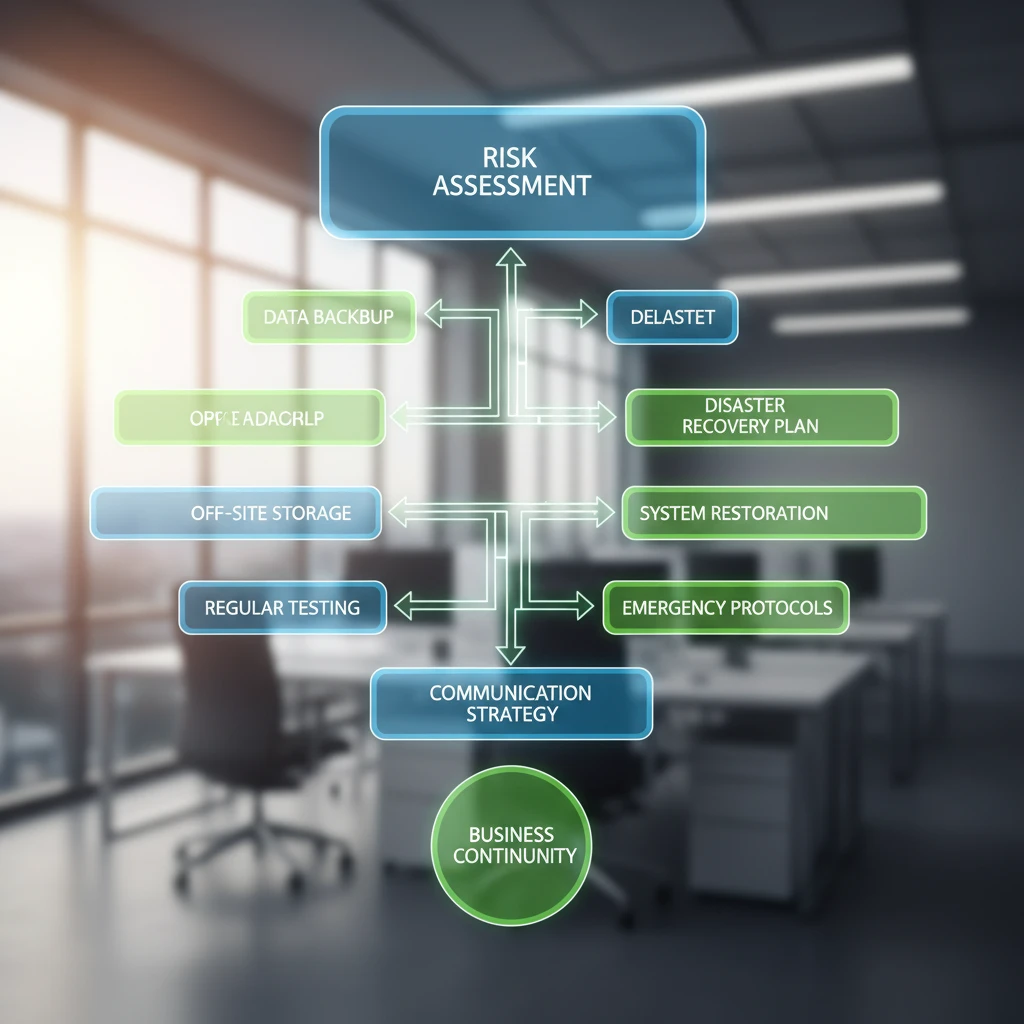
While hardware failure remains a concern, the modern threat landscape for data loss is far more diverse and complex. Cyberattacks, particularly ransomware, have become a significant concern for Australian SMBs, as highlighted in recent analyses of 2026 Australian SMB cybersecurity threats. These attacks can encrypt entire data sets, rendering them inaccessible without paying a ransom, which is never guaranteed to yield the data back. Beyond ransomware, data corruption due to software glitches, accidental deletion by employees, insider threats, and even natural disasters can lead to devastating data loss.
The sophistication of threats means that simply having a backup isn’t enough; the backup itself needs to be protected and regularly tested. Phishing attacks can compromise credentials, allowing attackers to access and potentially delete or corrupt backups. Furthermore, supply chain attacks can introduce malware that lies dormant until activated, targeting critical data stores. Businesses must adopt a multi-layered approach to data protection, recognising that threats can originate from both external actors and internal vulnerabilities. This evolving landscape demands more than just reactive measures; it requires a proactive and vigilant stance to future-proof your business.
The Hidden Costs of Downtime: Lost Productivity and Revenue
The immediate financial impact of downtime is often measured in lost sales or service delivery. However, the hidden costs can be far more substantial and long-lasting. When systems are unavailable, employees cannot perform their tasks, leading to a direct loss of productivity. For a typical Western Sydney SME with 20 employees, an hour of downtime can translate to thousands of dollars in lost wages and unbillable hours, not to mention the potential for project delays and missed client commitments. For example, a real estate agency unable to access its CRM and property listings for a day could miss out on multiple potential sales, impacting commission revenue significantly.
Beyond lost productivity, downtime erodes customer trust and satisfaction. If clients repeatedly encounter unavailability or delays, they will seek services elsewhere. This erosion of confidence can take months or even years to repair and may never be fully overcome. The reputational damage can deter new customers and impact brand perception. Furthermore, prolonged downtime can lead to regulatory fines, especially in sectors with strict compliance requirements. The true cost of downtime extends beyond immediate financial loss to include damage to reputation, customer attrition, and potential legal repercussions, making robust downtime reduction strategies crucial.
Customer Trust and Reputation: The Impact of Unavailability
In the digital age, a business’s online presence and operational reliability are intrinsically linked to its reputation. For Western Sydney businesses serving local communities, word-of-mouth and online reviews are powerful influencers. Consistent unavailability or slow recovery from an IT incident can quickly lead to negative reviews and a damaged public image. Customers today expect seamless access to services and information, and any disruption can be perceived as a sign of unprofessionalism or technical inadequacy.
Consider a small café that relies on its online ordering system and point-of-sale (POS) system. If the system is down during peak hours, not only are sales lost, but customers who experience the issue may share their negative experience on social media. This can deter potential patrons and tarnish the café’s reputation for reliability. Rebuilding that trust requires consistent service delivery and a demonstrable commitment to operational continuity, which includes having a solid IT security framework. Maintaining customer confidence is a long-term investment, and frequent IT failures can undo years of hard work in building a strong brand.
Beyond Basic Backups: Modern Data Protection Strategies for SMEs
The era of simply copying files to a USB drive or a single external hard drive is long past. Modern data protection requires a multi-faceted and strategic approach to ensure data is not only backed up but also secure, accessible, and recoverable in a timely manner. For Western Sydney SMEs, implementing advanced strategies is key to combating sophisticated threats and minimising business disruption. This involves understanding established best practices and adapting them to the current technological landscape and threat environment.
Moving beyond basic backups means embracing a layered defence strategy. This includes implementing robust backup solutions, but also prioritising data security, regular testing of recovery processes, and ensuring the chosen solutions align with business needs and budget. For instance, a business dealing with sensitive client data will have different recovery and security requirements than one primarily focused on internal operations. The goal is to create a resilient system that can withstand various forms of data loss and ensure business continuity, aligning with the proactive IT approach advocated for Western Sydney SMBs.
Understanding the 3-2-1 Backup Rule (and why it’s more critical than ever)
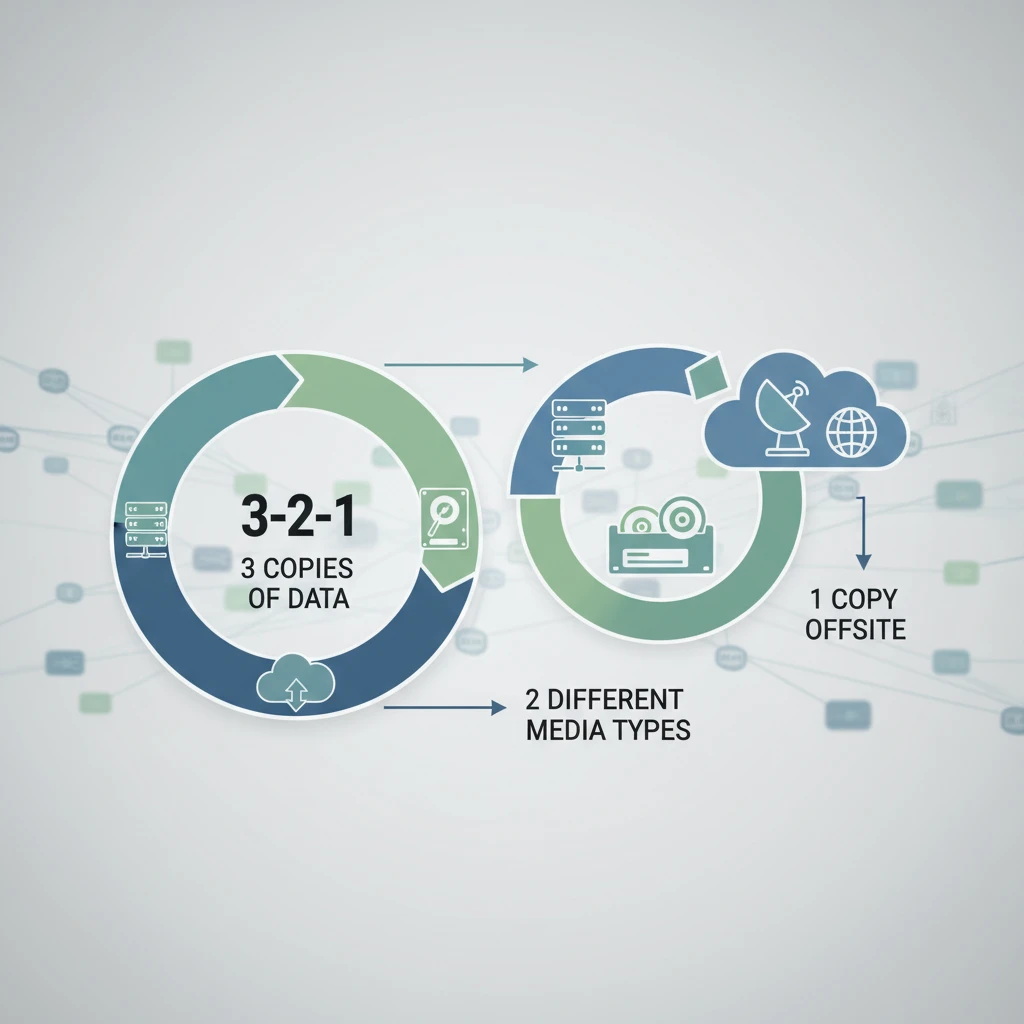
The 3-2-1 backup rule is a fundamental principle in data protection, advocating for: three copies of your data, stored on two different media types, with one copy located offsite. This strategy is designed to protect against a wide range of failure scenarios. Having three copies ensures that if one backup copy is corrupted or lost, you still have two alternatives. Using two different media types (e.g., local disk and cloud storage) mitigates risks associated with a single type of media failure.
The most crucial element, however, is the offsite copy. This protects your data from local disasters such as fire, flood, theft, or even ransomware attacks that could compromise all locally stored backups. In 2026, with the increasing prevalence of sophisticated cyber threats, a local-only backup strategy is a significant vulnerability. An offsite copy, especially one geographically distant from your primary location, ensures that even if your entire physical premises are compromised, your critical business data remains safe and recoverable. This principle is a cornerstone of building robust IT security for your business.
Cloud vs. Local Backups: Finding the Right Balance for Your Business
Deciding between cloud and local backups, or more commonly, a hybrid approach, is a critical decision for any Western Sydney business. Local backups offer fast recovery speeds for everyday file restores and are generally more cost-effective for large data volumes initially. They are ideal for quick access to frequently needed data. However, they are susceptible to local disasters and physical theft.
Cloud backups, on the other hand, provide excellent offsite protection, ensuring data is safe from local threats. They offer scalability and accessibility from anywhere, which is crucial for remote workforces and disaster recovery. Services like Microsoft Azure or AWS offer robust cloud infrastructure for backups. The primary drawbacks can be slower restore times for very large datasets and ongoing subscription costs. For most businesses in 2026, a hybrid strategy that combines the speed of local backups with the security of cloud storage offers the best of both worlds, ensuring both quick access and robust offsite protection. This approach is key to enhancing cloud reliability.
Automated vs. Manual Backups: Reducing Human Error and Ensuring Consistency
Human error is a leading cause of backup failures. Manually initiated or managed backups are prone to human oversight, such as forgetting to run a backup, misconfiguring settings, or failing to verify the integrity of the backup. This inconsistency can leave businesses exposed to data loss when it’s needed most. Automated backup solutions eliminate these variables by scheduling backups to run at predetermined intervals without any manual intervention.
Implementing automated backups ensures that your data is protected consistently and reliably, adhering to your defined backup policies. This means your backup schedule is always followed, reducing the risk of a catastrophic data loss event due to a missed backup. For example, scheduling daily incremental backups and weekly full backups ensures that even if a system fails, the most recent data is available for recovery. This consistent protection is vital for maintaining operational integrity and reducing the reliance on manual processes that can be prone to error, contributing to overall IT management and growth.
What Does ‘True’ Recovery Actually Look Like?
A robust backup strategy is only half the battle; the true measure of its effectiveness lies in the ability to recover data and systems quickly and completely. ‘True’ recovery means restoring your business operations to a functional state with minimal data loss and within acceptable timeframes. This goes beyond simply retrieving individual files and encompasses restoring entire systems, applications, and critical infrastructure to ensure business continuity. Understanding what constitutes successful recovery is essential for setting realistic expectations and designing appropriate strategies.
Achieving true recovery requires careful planning, appropriate tools, and rigorous testing. It involves defining your business’s tolerance for data loss and downtime and then aligning your backup and recovery solutions to meet those objectives. For many Western Sydney businesses, this means investing in solutions that not only protect data but also enable rapid restoration of entire IT environments, minimising the impact on productivity and customer service. This focus on readiness is paramount for navigating the unpredictable nature of IT challenges in today’s business climate.
Measuring Recovery Time Objectives (RTOs) and Recovery Point Objectives (RPOs)
To achieve true recovery, businesses must define their Recovery Time Objectives (RTOs) and Recovery Point Objectives (RPOs). RTO is the maximum acceptable amount of time that a system or application can be down after a disruption before it significantly impacts business operations. For critical systems, the RTO might be minutes or a few hours. For less critical ones, it could be days.
RPO is the maximum acceptable amount of data loss measured in time. It dictates how frequently backups need to be taken. If your RPO is one hour, it means you can afford to lose up to one hour of data. This directly influences backup frequency – the shorter the RPO, the more frequent the backups need to be. For instance, a financial services firm might have an RPO of 15 minutes and an RTO of 2 hours for its trading systems, requiring near real-time replication and rapid system failover. Defining and understanding these objectives is foundational to designing a backup and recovery strategy that meets your business’s specific needs and tolerance for risk, ensuring your IT support aligns with these critical business metrics.
The Difference Between Restoring Files and Restoring an Entire System
Restoring individual files is a common task when a user accidentally deletes a document or overwrites an important spreadsheet. This type of recovery is typically straightforward and can often be done quickly from recent backups. However, restoring an entire system, such as a server or a virtual machine, is a much more complex and time-consuming process. This involves recovering not only the data but also the operating system, applications, configurations, and network settings required for the system to function.
For example, if a ransomware attack encrypts a company’s primary file server, simply restoring individual user files from a backup might not be sufficient. The operating system of the server could also be compromised, and the applications installed on it might be inaccessible. True system recovery involves restoring the entire server image, often to a clean hardware environment or a virtual machine, ensuring all components are functional and reintegrated into the network. This level of recovery is critical for business continuity and requires a robust disaster recovery plan, as discussed in strategies for securing your business.
Testing Your Recovery Plan: The ‘Doomsday Scenario’ Preparedness
A backup and recovery plan is only as good as its tested execution. Many businesses create a plan but fail to regularly test it, leaving them unprepared when a real disaster strikes. Regular testing simulates potential failure scenarios, allowing you to identify weaknesses, refine procedures, and ensure your team knows exactly how to respond. These tests should range from simple file restores to full system recovery drills, simulating worst-case scenarios.
Think of it as a fire drill for your IT infrastructure. If you never practice evacuating the building, the real fire will be chaotic. Similarly, if your IT team has never performed a full system restore, the first attempt under pressure could be fraught with errors, extending downtime and increasing costs. Testing also verifies that your RTOs and RPOs are achievable with your current setup. For instance, a test might reveal that restoring your main server takes significantly longer than your RTO allows, prompting an upgrade in hardware or backup software. Proactive testing ensures you’re not caught off guard by a genuine IT emergency.
Common Backup & Recovery Pitfalls to Avoid
Implementing a backup and recovery strategy is a critical step, but many businesses fall into common traps that undermine their effectiveness. These pitfalls often stem from a lack of understanding, insufficient planning, or a failure to maintain the system over time. Recognizing and avoiding these common mistakes is as important as choosing the right technology. They can turn a seemingly solid backup solution into a costly point of failure when it’s needed most.
The consequences of these oversights can range from minor data loss to complete operational collapse. For Western Sydney SMEs, where resources might be more constrained, avoiding these mistakes is paramount to ensuring resilience and safeguarding their investment in technology. Let’s explore some of the most prevalent pitfalls that businesses encounter and how to steer clear of them.
Ignoring Software Updates and Compatibility Issues
One of the most frequent and insidious pitfalls is neglecting software updates for backup solutions and the systems they protect. Backup software, like any other application, receives regular updates to fix bugs, improve performance, and patch security vulnerabilities. Failing to update backup software can leave it vulnerable to exploits or cause compatibility issues with newer operating systems or applications, leading to failed backups or corrupted data.
Similarly, changes in your IT environment, such as deploying new applications or upgrading operating systems, can sometimes affect backup compatibility. If your backup solution isn’t updated or reconfigured to accommodate these changes, it may stop backing up certain data or functions correctly. For example, a business might upgrade its accounting software, but if the backup agent isn’t compatible with the new version, crucial financial data might not be captured. Regularly reviewing and updating all components of your backup infrastructure ensures it remains effective and aligned with your operational environment.
Insufficient Storage or Bandwidth for Backups
A common oversight is failing to provision adequate storage capacity or network bandwidth for backups. Businesses often underestimate the growth rate of their data and the requirements for retention policies. Insufficient storage space means backups may fail, or older, necessary backups might be automatically deleted to make room for new ones, compromising your ability to recover data from specific points in time.
Likewise, inadequate network bandwidth can significantly slow down backup processes, especially for cloud-based or offsite backups. This can lead to backups not completing within their scheduled windows, potentially impacting system performance during business hours or resulting in incomplete data transfers. For example, trying to back up several terabytes of data over a slow internet connection can take days, increasing the risk of data loss if a failure occurs before the backup is complete. Proper capacity planning and network assessment are crucial for a reliable backup strategy.
Failing to Encrypt Sensitive Data During Backup and Transit
Data security is paramount, and this extends to the backup process itself. Many businesses overlook the critical step of encrypting their sensitive data, both when it’s stored in the backup repository and when it’s being transferred over networks. Unencrypted backups, whether stored locally or in the cloud, are prime targets for cybercriminals. If a backup drive is lost or stolen, or if a cloud storage account is compromised, sensitive customer or business information can be easily accessed and exploited.
Encryption ensures that even if unauthorised parties gain access to your backup data, they cannot read or use it without the decryption key. Implementing strong encryption protocols for data at rest and in transit is a non-negotiable aspect of modern data protection, especially for businesses handling personal information, financial data, or intellectual property. This measure is a key component of comprehensive cybersecurity for Western Sydney.
Not Documenting Your Backup and Recovery Procedures
One of the most significant, yet often overlooked, pitfalls is the absence of clear, documented procedures for backup and recovery. Without a written plan, critical steps can be missed, especially during a high-stress recovery situation. Documented procedures provide a step-by-step guide for your IT team or managed service provider, ensuring consistency and accuracy in performing restores and managing backups.
A comprehensive document should include details such as backup schedules, data retention policies, encryption keys, contact information for vendors and support, step-by-step instructions for different recovery scenarios (e.g., single file restore, full server restore), and roles and responsibilities of personnel involved. This documentation is invaluable, especially if key personnel are unavailable. It ensures that your business can enact its disaster recovery plan efficiently and effectively, minimising downtime and data loss, and maintaining operational continuity.
Tailored Backup Solutions for Western Sydney’s Diverse Industries
Western Sydney is a vibrant economic hub, home to a wide array of industries, each with unique data needs and compliance requirements. A one-size-fits-all approach to backup and recovery simply doesn’t cut it. For instance, medical practices and NDIS providers face stringent regulations around patient confidentiality, making robust, secure, and compliant data protection paramount. Likewise, professional services firms and real estate agencies depend on the integrity and accessibility of sensitive client information, where even brief outages can lead to significant financial and reputational damage. Trades and service businesses, while perhaps dealing with different data types, rely heavily on consistent operational uptime to serve their customers and maintain their livelihood. Understanding these distinct needs is the first step towards implementing an effective backup and recovery strategy that safeguards your specific operations.
The critical decision criteria for selecting a backup solution should centre on data volume, recovery point objectives (RPO – how much data you can afford to lose), recovery time objectives (RTO – how quickly you need systems back online), industry regulations, and budget. For example, a small accounting firm might prioritise cost-effectiveness and ease of use, while a larger healthcare provider will need enterprise-grade security, detailed audit trails, and rapid recovery capabilities to meet compliance standards. Common pitfalls to avoid include neglecting regular testing, which can render backups useless when needed most, or relying solely on local backups, leaving businesses vulnerable to site-specific disasters like fires or floods. Implementing a strategy that aligns with your business’s risk tolerance and operational demands is crucial for true data resilience.
Protecting Patient Data: Backup & Recovery for Medical and NDIS Providers
For medical practices, dental clinics, and NDIS providers in Western Sydney, the stakes for data protection are exceptionally high. Patient health information (PHI) is highly sensitive and governed by strict privacy laws, including the Australian Privacy Principles. A breach or data loss event can not only lead to severe regulatory penalties and significant fines but also irrevocably damage patient trust. Therefore, backup and recovery solutions must offer robust encryption, granular access controls, and clear audit trails to ensure compliance and security. The RPO for these organisations must be near-zero, meaning any data loss is unacceptable. RTOs also need to be very short, as disruptions to patient care systems can have immediate and severe consequences.
Key decision factors include ensuring the backup solution complies with data residency requirements if applicable, and offers secure, encrypted storage both in transit and at rest. The ability to perform quick, targeted restores of specific patient records is also vital. Common pitfalls include inadequate encryption, insufficient retention periods that fail to meet legal requirements, or a lack of regular, documented testing of restore procedures. For example, a small GP clinic might implement a cloud-based backup solution that automatically encrypts all patient records daily, with retention set for seven years and quarterly restore tests performed by their IT provider. This ensures compliance, minimises data loss risk, and provides confidence in their ability to recover should an incident occur.
Securing Client Information: IT Resilience for Professional Services and Real Estate
Professional services firms such as law firms, accounting practices, and consultancies, along with real estate agencies in Western Sydney, handle vast amounts of confidential client data. This includes personal details, financial records, legal documents, and property information. The integrity and availability of this data are fundamental to client relationships and business operations. A cyber-attack, hardware failure, or accidental deletion could not only result in significant financial loss due to downtime and potential data theft but also trigger reputational damage and legal liabilities. Therefore, a comprehensive backup and recovery strategy is not just an IT function; it’s a core business continuity imperative. Ensuring systems can be restored quickly and accurately protects against operational paralysis and maintains client confidence.
When selecting backup solutions, consider the volume and sensitivity of your data, your RPO/RTO requirements, and budget constraints. Features like strong encryption, version control for documents, and rapid granular restores are essential. Pitfalls to avoid include neglecting backups for less frequently accessed systems, using outdated backup media, or failing to verify backup integrity regularly. For a real estate agency, this might mean implementing an automated daily backup of their CRM and property listings database, with monthly full system backups stored offsite. They would also conduct quarterly test restores of key files and databases to confirm system readiness. This approach safeguards critical client information and ensures business operations can resume swiftly after an unforeseen event, aligning with the need for robust cyber resilience.
Keeping Trades and Services Online: Ensuring Operational Continuity
Trades and service businesses across Western Sydney, from plumbers and electricians to IT support companies and landscapers, rely heavily on their IT systems to operate efficiently. This includes customer databases, scheduling software, invoicing systems, mobile device data, and project management tools. While they may not handle the same volume of highly sensitive personal data as medical or legal firms, a disruption to these systems can lead to significant productivity loss, missed appointments, delayed invoicing, and ultimately, lost revenue. The ability to quickly restore access to essential business applications and customer information is crucial for maintaining customer satisfaction and business momentum. Downtime directly translates to lost income, making operational continuity a top priority.
The decision criteria here often revolve around affordability, ease of use, and the ability to recover essential business data quickly. The focus is on minimising downtime so that field service technicians can access job details, office staff can manage schedules, and financial data remains intact. A common pitfall is underestimating the impact of losing data from mobile devices or assuming that a single backup copy is sufficient. For example, a local electrical contractor might implement a solution that backs up their office server daily and also synchronises critical data from their technicians’ tablets to a secure cloud location. They would ensure that their invoicing software and customer contact lists are easily restorable, and that their IT support provider can bring these systems back online within a few hours of an incident, thus minimising costly business downtime.
Leveraging the Cloud for Robust Disaster Recovery
The cloud has revolutionised disaster recovery (DR) strategies for businesses of all sizes. By moving critical data and applications offsite to secure, geographically dispersed data centres, businesses can significantly mitigate the risks associated with local hardware failures, natural disasters, or cyber-attacks that could compromise on-premises infrastructure. Cloud-based DR solutions offer a level of resilience and scalability that was previously only accessible to large enterprises, making advanced business continuity planning attainable for SMEs in Western Sydney. The inherent redundancy and advanced security measures employed by cloud providers ensure that your business data is protected against a much wider range of threats than traditional, localised backup methods alone can provide.
When considering cloud-based DR, key decision factors include the provider’s service level agreements (SLAs) regarding uptime and recovery times, the security protocols in place, data residency options, and the cost structure. Understanding how data is replicated and protected across multiple data centres is vital. A common pitfall is assuming that all cloud backup is inherently secure or automatically compliant with industry regulations; careful selection and configuration are paramount. For a growing business in Western Sydney, leveraging the cloud for DR means they can avoid the substantial capital expenditure of building and maintaining their own secondary data centre while gaining access to enterprise-grade protection. This proactive approach ensures that business operations can continue with minimal interruption, regardless of unforeseen events.
Offsite Data Storage: Mitigating Risks from Local Disasters
Localised disasters such as fires, floods, severe storms, or even significant theft can render an entire physical office location inaccessible or destroy all on-site IT equipment. Relying solely on backups stored within the same building creates a single point of failure. Offsite data storage, particularly when utilising cloud services, ensures that even if your primary location is completely compromised, your business data remains safe and accessible from another location. This is a fundamental component of any robust disaster recovery plan, providing a critical safeguard against catastrophic data loss. The geographical separation of backups from the primary site is a non-negotiable aspect of comprehensive business continuity.
Key decision criteria for offsite storage include the security measures employed by the storage provider (encryption, access controls), the speed at which data can be retrieved, and the associated costs. It’s essential to ensure that the offsite storage solution meets any regulatory compliance requirements for data handling and retention. A common pitfall is insufficient bandwidth, which can drastically increase recovery times when large volumes of data need to be downloaded. For example, a consulting firm in Parramatta might store daily backups of all their client files and project documentation on a secure cloud platform. In the event of a fire at their office, they could resume operations from a temporary location or work-from-home arrangement, accessing their critical data within hours, thereby securing their business continuity.
Scalability and Accessibility: Growing Your Backup Strategy with Your Business
As businesses in Western Sydney expand, their data volumes invariably grow, and their IT needs evolve. A static backup solution that cannot adapt will quickly become inadequate, posing a risk to business continuity. Cloud-based backup and recovery solutions are inherently scalable, allowing businesses to increase their storage capacity or processing power as needed without significant upfront hardware investment or complex infrastructure changes. This agility is crucial for SMEs that experience rapid growth or seasonal fluctuations in their data needs. Furthermore, cloud accessibility ensures that authorised personnel can access and manage backup systems and restore data from virtually anywhere with an internet connection, facilitating flexible work arrangements and rapid response during an emergency.
When evaluating cloud solutions, consider their scalability features: how easily can you add more storage? Are there tiered service plans that can accommodate future growth? What are the associated costs for scaling up? A critical pitfall is choosing a solution that locks you into a fixed capacity, forcing costly upgrades or compromises later. For a small e-commerce business in Liverpool that anticipates significant growth during peak seasons, a cloud backup solution that allows them to scale storage up during November and December and then scale it back down in January would be ideal. This ensures they have sufficient resources during busy periods without overpaying for unused capacity, providing both cost-efficiency and performance.
Disaster Recovery as a Service (DRaaS): Advanced Protection Made Accessible
Disaster Recovery as a Service (DRaaS) represents a significant advancement in business continuity, offering a comprehensive solution that bundles backup, replication, and failover capabilities into a single, managed service. DRaaS providers replicate your critical systems and data to their cloud infrastructure. In the event of a disaster, these systems can be brought online virtually in the provider’s cloud, allowing your business to continue operating with minimal interruption while your primary site is restored. This goes beyond simple data backup by ensuring that your applications and operational environments are also protected and readily available, providing a much higher level of resilience and a vastly improved RTO.
The key benefits of DRaaS include significantly reduced RTOs, simplified management compared to maintaining a separate DR site, and predictable costs. Decision criteria should focus on the provider’s expertise, the reliability of their failover infrastructure, and the ease of testing and initiating a failover. A common pitfall is not understanding the RTO/RPO guarantees within the DRaaS contract or failing to perform regular failover tests, which can reveal hidden complexities. For a medium-sized manufacturing firm in Western Sydney that cannot afford significant downtime, implementing a DRaaS solution would mean that if their production facility experienced a critical failure, their core business systems could be running in the cloud within minutes, allowing them to maintain order processing and critical operations, thus leveraging managed services for growth.
The Role of Managed IT Services in Seamless Backup & Recovery
For many small to medium businesses in Western Sydney, managing backup and disaster recovery effectively can be a significant challenge, often due to limited in-house IT expertise or resources. This is where a Managed IT Services Provider (MSP) plays a crucial role. An MSP acts as an extension of your business’s IT department, taking responsibility for the design, implementation, monitoring, and maintenance of your backup and recovery strategy. They bring specialised knowledge, industry best practices, and the necessary tools to ensure your data is protected, compliant, and recoverable when you need it most. Partnering with an MSP allows you to focus on your core business operations, confident that your IT resilience is in expert hands.
The primary benefit of engaging an MSP for backup and recovery is the assurance that the process is handled professionally and proactively. This includes selecting appropriate technologies, configuring them correctly, and ensuring they align with your business’s specific needs and risk profile. Pitfalls of managing it yourself can include overlooking critical configuration settings, using unverified software, or simply lacking the time for diligent oversight, which can lead to backup failures. For a professional services firm, an MSP would not only set up automated backups but also provide regular reports, conduct test restores, and advise on best practices, ensuring comprehensive data protection and regulatory compliance.
Proactive Monitoring and Alerting: Catching Issues Before They Impact You
One of the most significant advantages of a managed approach to backup and recovery is proactive monitoring. Instead of waiting for a failure to discover that backups haven’t been running or have been corrupted, an MSP continuously monitors your backup jobs. Automated systems track the success or failure of each backup, check for any errors, and alert the IT team immediately if a problem arises. This allows for swift intervention, often before the issue even impacts your operations. Early detection and resolution of backup problems are critical for maintaining the integrity and reliability of your data protection strategy, preventing potentially devastating data loss scenarios.
Key aspects of proactive monitoring include setting up comprehensive alert thresholds, ensuring that notifications are directed to the appropriate personnel, and having a clear process for investigating and resolving alerts. A common pitfall is a poorly configured monitoring system that generates too many false positives or misses critical errors. For a busy medical practice, having an MSP monitor their backup system 24/7 means that if a backup job fails overnight, the practice manager is alerted first thing in the morning, and the issue is already being addressed by the IT team, ensuring patient data remains protected and accessible for the next day’s appointments. This level of vigilance provides peace of mind and operational stability.
Expert Configuration and Management: Ensuring Your Backups Work When You Need Them
Proper configuration of backup software and hardware is fundamental to its effectiveness. This involves understanding retention policies, deduplication settings, encryption protocols, scheduling, and bandwidth management, among other technical details. Without expert configuration, backup systems can be inefficient, consume excessive resources, fail to capture all necessary data, or even produce corrupt backups. Managed IT services providers bring the specialised knowledge and experience required to correctly set up and manage these complex systems, ensuring they are aligned with your business’s specific requirements and compliance obligations. This expertise is vital for safeguarding your business’s most critical asset: its data.
When engaging an MSP for this service, consider their experience with your specific industry and the backup technologies you use. Ensure they have a clear methodology for managing configurations and documenting changes. A common pitfall is using default settings or assuming that a “set it and forget it” approach will suffice, which can lead to vulnerabilities. For a real estate agency that relies on accurate and up-to-date property listings and client contact information, an MSP would ensure their backup solution is configured to capture all relevant databases and files daily, with appropriate retention policies in place. They would also manage the ongoing updates and patches for the backup software, guaranteeing that it remains a reliable safeguard for critical business information.
Regular Testing and Verification: Peace of Mind Through Proven Processes
The ultimate test of any backup system is its ability to restore data successfully when it’s needed. Many businesses make the critical mistake of assuming their backups are functional without ever verifying them. Regular testing and verification are non-negotiable components of a robust disaster recovery strategy. Managed IT services providers routinely perform test restores of data and even entire systems to ensure that the backup process is working as expected and that data can be recovered quickly and accurately. This proactive validation provides invaluable peace of mind and identifies any potential issues before they can cause a real-world crisis, such as those that might impact businesses in the Western Sydney SMB proactive IT advantage.
The frequency and scope of testing should be determined by your business’s RPO and RTO requirements, as well as any regulatory obligations. This might involve testing individual file restores, database recoveries, or full system failovers. A common pitfall is conducting tests too infrequently or not documenting the results, which can lead to a false sense of security. For a small accounting firm that needs to access historical financial records for audit purposes, an MSP would perform quarterly test restores of their accounting software database. This ensures that if an audit requires them to retrieve data from previous years, they can do so efficiently and accurately, confirming the integrity and recoverability of their financial data.
Security First: How Backup Protects Against Ransomware and Cyber Threats
In today’s digital landscape, ransomware and other cyber threats pose a significant and persistent risk to businesses across Western Sydney. These malicious attacks aim to encrypt your data, making it inaccessible until a ransom is paid, often with no guarantee of recovery. While prevention is key, a robust backup and recovery strategy acts as your ultimate safety net. It provides a means to restore your operations and data without succumbing to the demands of cybercriminals. By having secure, up-to-date, and readily restorable backups, you dramatically reduce the leverage that ransomware attackers have over your organisation, transforming a potential catastrophe into a manageable incident. This is a critical element of maintaining Australian SMB cybersecurity resilience.
The core principle is that if you can restore your data from a clean backup, the impact of a ransomware attack is significantly minimised. Decision criteria for backup solutions in this context should prioritise features like immutability, air-gapping, and offsite storage, which make it harder for ransomware to compromise your backups. A common pitfall is relying on backups that are connected to the same network as your production systems, as ransomware can spread and encrypt them as well. Implementing a layered security approach where backups are a vital component ensures that your business can withstand and recover from even sophisticated cyber threats, thereby protecting your critical digital assets.
Immutable Backups: The Last Line of Defence Against Data Encryption
Immutable backups are a game-changer in the fight against ransomware. Once data is written to an immutable backup, it cannot be altered or deleted for a specified period. This means that even if a ransomware attack successfully infiltrates your primary systems and attempts to encrypt or destroy your backups, the immutable copies remain safe and untouched. This feature provides an invaluable layer of protection, ensuring that you always have a clean, original copy of your data to restore from. Immutability is a powerful deterrent and a crucial element for businesses seeking to build a truly resilient defence against data-encrypting malware, becoming the ultimate safeguard.
When considering backup solutions, look for options that explicitly offer immutability, often referred to as “write-once, read-many” (WORM) storage. The duration of immutability is a key decision factor, and it should be configured based on your data retention policies and threat assessment. A common pitfall is confusing immutability with simple write protection, which can be bypassed by administrators. For a small business in Western Sydney that handles sensitive client financial data, implementing immutable cloud backups ensures that even a sophisticated ransomware attack cannot compromise their ability to restore their accounting records, thereby maintaining their operational integrity and client trust. This provides a robust defence against threats that aim to hold your business data hostage.
Restoring Clean Data: Recovering Safely After a Breach
Following a cyber-attack, particularly a ransomware incident, the ability to restore clean, uncompromised data is paramount. Restoring data from a backup that has also been infected or tampered with is worse than no recovery at all, as it risks reinfecting your systems. Expert backup and recovery strategies focus on ensuring that the restored data is free from malware and has not been corrupted. This involves selecting backup solutions that scan for malware during the backup process or, critically, allow for granular restoration from specific points in time before an infection occurred. The focus is on a safe, secure, and complete return to operational normalcy.
Key decision criteria include the backup system’s ability to perform point-in-time restores and any integrated malware scanning capabilities. The process for verifying the integrity of restored data is also crucial. A common pitfall is rushing the restore process and failing to adequately verify that the restored data is clean, leading to secondary infections. For a digital marketing agency that relies on access to client campaign data, the ability to perform a clean restore from a verified, pre-infection backup means they can quickly resume campaign management and reporting without further disruption or risk, reinforcing their practical cybersecurity approach.
The Importance of Offsite and Air-Gapped Backups
To truly protect against the most sophisticated cyber threats, including advanced ransomware, a combination of offsite storage and air-gapping is essential. Offsite backups ensure that your data is physically separate from your primary network and location, protecting it from local disasters and physical theft. Air-gapped backups take this a step further by ensuring that the backup data is completely disconnected from your live IT environment. This means that even if your network is compromised, the air-gapped backups remain inaccessible to attackers, effectively creating an unbreakable shield. This dual strategy provides the highest level of defence against data loss and ransomware encryption.
When implementing offsite and air-gapped backups, consider the accessibility and speed of recovery for offsite data, and the process for safely connecting and disconnecting air-gapped systems. A common pitfall is not maintaining the air gap rigorously, or having an offsite backup that is too slow for effective recovery. For a critical infrastructure provider in Western Sydney, maintaining air-gapped backups of their control systems would be non-negotiable. This ensures that even in the face of a highly targeted cyber-attack, their essential operational data remains secure and restorable, providing a critical fallback to maintain service delivery and prevent widespread disruption, aligning with the need to reliable IT support.
Your Action Plan: Evaluating Your Current Backup & Recovery Strategy
A robust backup and recovery strategy isn’t a ‘set it and forget it’ solution. It requires ongoing assessment to ensure it remains effective against evolving threats and business needs. The first step is a comprehensive data audit to understand precisely what you’re protecting. This involves identifying all critical business data – from client records and financial statements to intellectual property and operational databases. Without a clear picture of your data landscape, you risk overlooking vital information, leaving it vulnerable to loss. Consider implementing a data classification system to categorise data by its importance and sensitivity, guiding your backup priorities and retention policies. Knowing your data is the bedrock of effective protection.
Data Audit: What Critical Information Needs Protection?
Begin your data audit by cataloguing all data sources across your organisation. This includes servers (both physical and virtual), workstations, cloud storage (like Microsoft 365 or Google Workspace), mobile devices, and any third-party applications storing proprietary information. For each data source, determine its purpose, who owns it, its typical volume, and its sensitivity. Are you handling personal information subject to Australian privacy laws? Is it operational data essential for daily business functions? Or is it historical data with long-term compliance requirements? Documenting data locations, formats, and access permissions is crucial. For example, a medical practice in Western Sydney must meticulously audit patient records (Protected Health Information – PHI) alongside appointment scheduling systems and billing information, understanding that PHI requires stringent security and recovery protocols. This detailed understanding informs the scope and frequency of your backups. Tools for automated data discovery can significantly streamline this process, identifying data across your network and cloud environments. This proactive approach ensures no critical information is left unprotected, thereby strengthening your overall business continuity plan. A thorough data audit is an investment in data integrity.
Risk Assessment: What Scenarios Could Disrupt Your Business?
Once you know what data needs protecting, the next critical step is a comprehensive risk assessment to identify potential threats and vulnerabilities. This isn’t just about hardware failure; consider a wide range of scenarios. Cyberattacks, including ransomware and phishing, are a primary concern, as highlighted by ongoing reports of Australian businesses falling victim. Beyond digital threats, natural disasters like floods or bushfires can impact physical infrastructure. Accidental deletion by staff, software corruption, or even theft of devices can lead to data loss. For businesses in Western Sydney, understanding local risks, such as potential impacts from severe weather events, is also important. A robust assessment should quantify the likelihood of each scenario occurring and the potential impact on business operations, finances, and reputation. For instance, a ransomware attack might encrypt critical client databases, rendering your business unable to operate for days or weeks. Evaluating these risks allows you to tailor your backup and recovery solutions to mitigate the most probable and impactful threats. Consider using frameworks like the NIST Cybersecurity Framework to guide your assessment process. Regularly revisiting this assessment is vital, as new threats and vulnerabilities emerge continuously, and your business operations may also evolve. This ongoing evaluation ensures your protection measures remain relevant and effective.
For example, a small accounting firm in Parramatta might identify the following risks: ransomware encrypting client financial data (high likelihood, high impact), a server hardware failure (medium likelihood, medium impact), and an employee accidentally deleting critical tax files (medium likelihood, low impact). Understanding these scenarios helps prioritise how much time and resources to dedicate to preventing and recovering from each. This proactive risk management is a cornerstone of building a resilient business. By understanding potential disruptions, you can take targeted steps to prevent them and ensure you can quickly recover when the unexpected occurs. This preparedness significantly reduces the potential damage to your operations and reputation.
Defining Your Recovery Needs: How Quickly Do You Need to Be Back Online?
Defining your recovery needs involves establishing key metrics: Recovery Point Objective (RPO) and Recovery Time Objective (RTO). Your RPO is the maximum amount of data loss you can tolerate, measured in time. For example, if your RPO is 24 hours, you’re willing to lose up to a day’s worth of data. Your RTO is the maximum time your business can be offline after a disaster before suffering unacceptable consequences. If your RTO is 4 hours, you need to be fully operational within that timeframe. These objectives are directly tied to the criticality of your data and business processes. For a 24/7 online retailer, an RPO of minutes and an RTO of near-zero are essential. In contrast, a business with less time-sensitive operations might tolerate a longer RPO and RTO. Aligning your RPO/RTO with business continuity requirements is paramount.
Consider a professional services firm in Penrith. If their client-facing proposal system goes offline for more than two hours, they risk losing new business opportunities and damaging client trust. This dictates a strict RTO. Similarly, if they can’t afford to lose more than four hours of billable client work, that sets their RPO. These metrics directly influence the type of backup solutions you implement, the frequency of backups, and the testing procedures. For example, a low RTO might necessitate near-continuous data replication or hot standby systems, while a higher RTO might be achievable with daily or hourly backups. Tools like cloud-based disaster recovery services can help meet aggressive RTOs by providing rapid failover capabilities. Without clearly defined RPOs and RTOs, your backup strategy may be inadequate, leading to extended downtime and significant financial losses. A thorough analysis of business impact is key to setting realistic and effective recovery targets, ensuring your IT infrastructure supports, rather than hinders, your business’s ability to operate.
Partnering for Resilience: Expert IT Support in Western Sydney
Navigating the complexities of modern IT, especially concerning data security and recovery, can be overwhelming for small to medium businesses. This is where partnering with an experienced managed IT services provider becomes invaluable. An expert provider in Western Sydney offers more than just reactive fixes; they offer proactive strategies designed to protect your business from the ground up. They bring specialised knowledge in areas like data encryption, secure cloud storage, and sophisticated backup and disaster recovery solutions that might be beyond the scope of an internal team. Choosing the right IT partner ensures your business benefits from cutting-edge technology and best practices, without the need for extensive in-house training or infrastructure investment. They act as an extension of your team, dedicated to keeping your operations running smoothly and securely.
An expert IT partner can conduct a thorough analysis of your current infrastructure, identifying vulnerabilities and recommending tailored solutions. This includes implementing robust cybersecurity measures, which are increasingly critical given the evolving threat landscape, as detailed in resources like the Australian Cyber Security Centre’s Essential Eight mitigation strategies. They can also develop and regularly test your disaster recovery plan, ensuring that in the event of an incident, your business can resume operations with minimal disruption. For example, a managed IT service provider could implement a multi-layered backup strategy involving local backups for fast recovery of individual files and cloud-based backups for off-site protection against site-wide disasters. This comprehensive approach provides peace of mind, allowing you to focus on growing your business. Their expertise can translate directly into reduced downtime, enhanced data security, and improved operational efficiency, essentially transforming IT from a cost centre into a strategic asset for growth.
Consider the tangible benefits: reduced risk of data loss, faster recovery times, improved compliance with data protection regulations, and the ability to leverage technology for competitive advantage. For businesses in Western Sydney, engaging a local IT expert means understanding the specific challenges and opportunities within the region. They can offer tailored advice that considers local infrastructure, business types, and regulatory environments. For instance, a medical practice requires specialised IT support to manage sensitive patient data securely and compliantly, a task that a general IT provider might not fully grasp. A specialised provider, however, will have the knowledge and experience to implement appropriate safeguards. This level of dedicated support and strategic insight is crucial for achieving a proactive IT advantage and ensuring long-term business resilience. They become a trusted advisor, helping you make informed technology decisions that support your strategic objectives.
Ultimately, partnering with an expert IT provider like Digitek IT empowers your Western Sydney business to not only protect its valuable data but also to thrive in an increasingly digital world. Their commitment extends to ensuring your systems are reliable, secure, and scalable, directly contributing to your business’s success and stability. This collaboration is about building a resilient foundation for future growth and mitigating the inherent risks of modern business operations.